
Bring your people in.
Start with the handful you’d hate to lose touch with. Type a name, pick from Contacts or paste a list from somewhere else, and you’re set up in about five minutes.

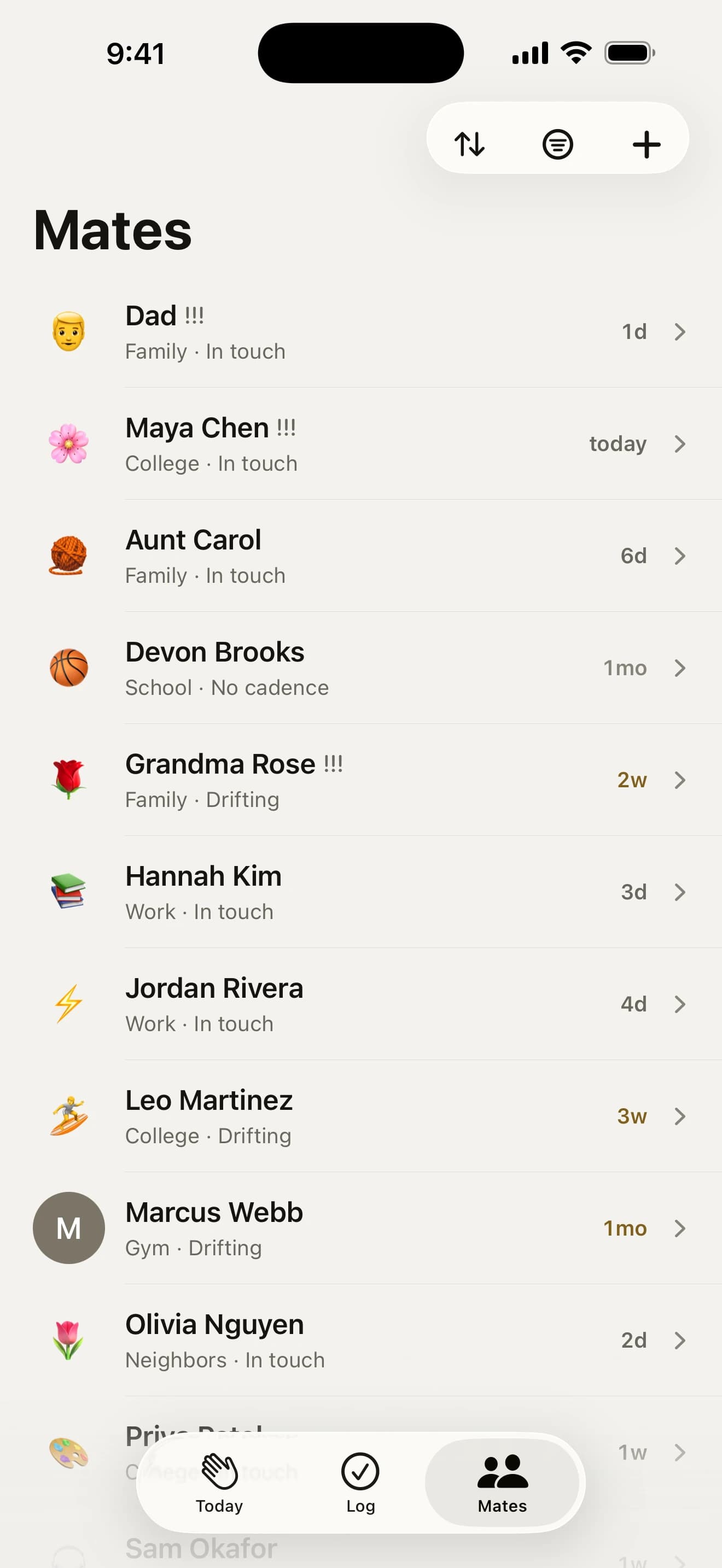
At a glance
- From ContactsNames, birthdays, photos and a number, only when you tap to bring them in.
- Paste a listNames from Notes, a spreadsheet or a CSV exported from another app.
- Just met someone?Save them while you’re still standing next to them.
- Tidy in one goSort, merge and change dozens of mates at once.
How do I add friends from my Contacts?

Open Add and tap “Find people in my contacts”. It’s the only moment the app asks for Contacts, and nothing ever leaves your phone. Each mate comes in with:
- their name, birthday, photo and one phone number
- any anniversaries on the card, as important dates
- a partner’s or kids’ names, as things to remember
A short Suggested list sits above everyone else: the people you’ve saved a birthday or photo for, or a name like Mum or Grandad. Keep groups in Contacts, like Family or Footy? Tap one to tick everyone in it, and they arrive already in that group.
How many should I start with?

Three is a good start. For your first week, Today’s goal is to get three mates in and catch up with each. Every slot fills with a face once you log them, and while you have fewer than three, the empty ones open Add.
Still under three on day three? You get one notification naming who’s in and asking who else you want to keep close. It comes once, and not at all if a nudge is already on its way.
Can I paste in a list from somewhere else?

Yes. Paste it into the search on Add mates: names from Notes, one a line or split by commas, or a CSV copied out of a spreadsheet or exported from another app. Every name lands as a chip you can tap to leave out, and one Add saves the lot.
A CSV brings each person’s last catch-up, rhythm, birthday, notes and phone number wherever it has them, so the people you spoke to last week aren’t suddenly overdue. Settings › Data › Move from Another App opens Add ready for it.
Just met someone?

The moment you meet someone is the one time you’re standing next to their number. Tap “Just met someone?” on Add: their name, where you met and their number, and Save.
Research suggests a new friendship grows on the time you spend together early on, so they come up every week for their first eight weeks, then settle to monthly. The first nudge comes five days later: “You met Jo at the climbing gym 5 days ago. Say hi?”
Brought in your whole address book?

Sort your mates deals them out one card at a time, a tap or a swipe each, with Undo. Add 25 or more at once and it comes straight up as the last step, with just the people you added, in the order you picked them:
- Close: every two weeks
- Regular: every month
- Now and then: every three months
- Not really: archived, with their history kept
Anyone you’ve never logged also gets chips for when you last caught up, from This week to Ages ago, so their first nudge lands when it should. Close mates come up first, about three a day, so nothing piles up. Tap Finish later and the rest wait a week before they come up, and a card on Mates (and on Today, in your first week) takes you back to the cards.
Changed your mind? Adding ten or more at once offers Undo straight away (at 25 and up, the cards come up instead), and for a week a card on Mates lets you keep them all or remove the ones you won’t keep up with.
Keeping your list tidy

- Select many. Search or filter Mates and tap Select above the list, tick a dozen and give them all a rhythm, a group or the archive in one go.
- Merge doubles. Typed someone in and imported them again? Mates spots the two copies and merges them, every check-in and note kept.
- Pairs. Mark a couple or flatmates as “Comes as a pair” and logging one ticks the other.
- Stay in step. Once a day the app rereads imported cards, on your iPhone, so a new number or photo comes across by itself.
Tap anyone’s face to give them one of 90 hand-drawn sketches, an emoji, a photo or just their initial.
Your questions, answered
Can I add people who aren’t in my Contacts?
Yes. On Mates, tap +, type their name and tap Create on the row that appears. The app never needs Contacts for that. Got a list in Notes or a spreadsheet? Paste it into the same field, one name a line or split by commas, and every name shows up ready to add with one tap. Anyone who’s already a mate starts unticked, so nobody is added twice.
Can I move from Garden or another app?
Yes. Export a CSV from your old app, or copy the spreadsheet your list lives in, and paste it into the search field on Add mates (Settings › Data › Move from Another App opens it ready). Everyone comes across at once, with their last catch-up, rhythm, birthday, notes and phone number when the list has them. Garden has no export, so for Garden the quickest way across is “Find people in my contacts”. What you paste never leaves your iPhone.
I imported all my contacts. Now what?
Sort them. Add 25 or more at once and the sorting cards come straight up with just the people you added, in the order you picked them; any other time, choose “Sort your mates…” from the sort button on Mates. Each mate gets a card: Close sets every two weeks, Regular every month, Now and then every three months, and Not really archives them with their history kept. For anyone you’ve never logged, the card also asks when you last caught up, so their first nudge counts from then. Nobody piles up: the mates you sort as Close come up first, about three a day, and anyone you leave for later waits a week before coming up. Changed your mind? For a week, a card on Mates lets you remove the whole batch.
Can I change lots of mates at once?
Yes. On the Mates tab, tap the search bar or a filter and Select appears above the list (or press and hold a mate and tap Select multiple). Tick the mates you mean, or Select all to take everyone the search or filter is showing. The bar along the bottom gives them all a rhythm, puts them in a group, texts 2 to 20 of them together or archives them, each with Undo. More logs a catch-up with all of them or deletes them, and deleted mates wait 30 days in Settings › Archived mates › Recently deleted.
I just met someone. How do I keep in touch?
Open Add and tap “Just met someone?”: their name, where you met and their number, then Save. Research suggests a new friendship grows on the time you spend together early on, so they come up every week for eight weeks, then settle to monthly. The first nudge comes five days later (“You met Jo at the climbing gym 5 days ago. Say hi?”). Leave “Text them now” on and Messages opens with a short hello, so they have your number too.
I typed my mates in. Can I add their numbers from Contacts later?
Yes. On a mate with no number, tap Call or Text and pick “Find them in Contacts”. If the app can already see your contacts it offers the people with that name; otherwise the iPhone’s own contact picker opens, which needs no permission and shares only the one card you choose. Their number, birthday and photo come across, and a birthday you typed stays put.
I added someone twice. Can I merge them?
Yes. When two mates share a phone number, a contact card or a name, a card at the top of Mates says they look like the same person. Tap Review to see each pair side by side, pick the one to keep, then Merge, or choose “Merge with…” from the ••• menu on a mate’s page. Every check-in, note, date and gift idea from both is kept. A merge can’t be undone, so it asks first, and Not the same stops the suggestion.
I searched Mates for someone and they’re not there. Now what?
Tap Find them in Contacts. Add opens with the name already typed, so anyone in your address book who matches is one tap away, and Create adds them as a new mate if they aren’t there. If the person is archived, they show up too, with Restore to put them back in your list.
Can I track a couple together?
Yes. Open one of them, tap ••• then “Comes as a pair with…” and pick the other. Each keeps their own rhythm and their own row on Mates. Log one and the check-in ticks the other too, and a quick swipe asks “Tom too?”. When both are due on the same day, Today shows a single “Ana & Tom” row and you get one nudge for the two of them.
Can I see who someone is without opening their page?
Yes. Press and hold them on Today or Mates and their card lifts out of the list: how the friendship is going, when you last talked and how, a birthday or date in the next two months, and two of the things you’ve kept to remember. Call, text or log from the menu under it, tap the card for their whole page, or let go to drop it back.
Can I change how a mate looks in the app?
Yes. Tap their face at the top of their page and pick one of 90 hand-drawn sketches, an emoji, a photo from your library or just their initial. It saves straight away, with Undo if you change your mind. Mates you bring in from Contacts keep their contact photo until you pick something else.



Go on, say howdy.
Free on the App Store for iPhone. No account, no subscription, no catch.
On a computer? Point your iPhone’s camera here.