
Log a catch-up in one tap.
Texted, called, grabbed a coffee? Tap their name and you’re done. Add a note, a photo or how it went only if you feel like it.

At a glance
- Two taps, topsIt starts on the way you usually catch up.
- Logs itselfCall or text from the app and it’s logged when you’re back.
- Just say itType or dictate “Coffee with Ana yesterday”.
- Whole groupsLog the book club in one go.
What’s the quickest way to log a catch-up?
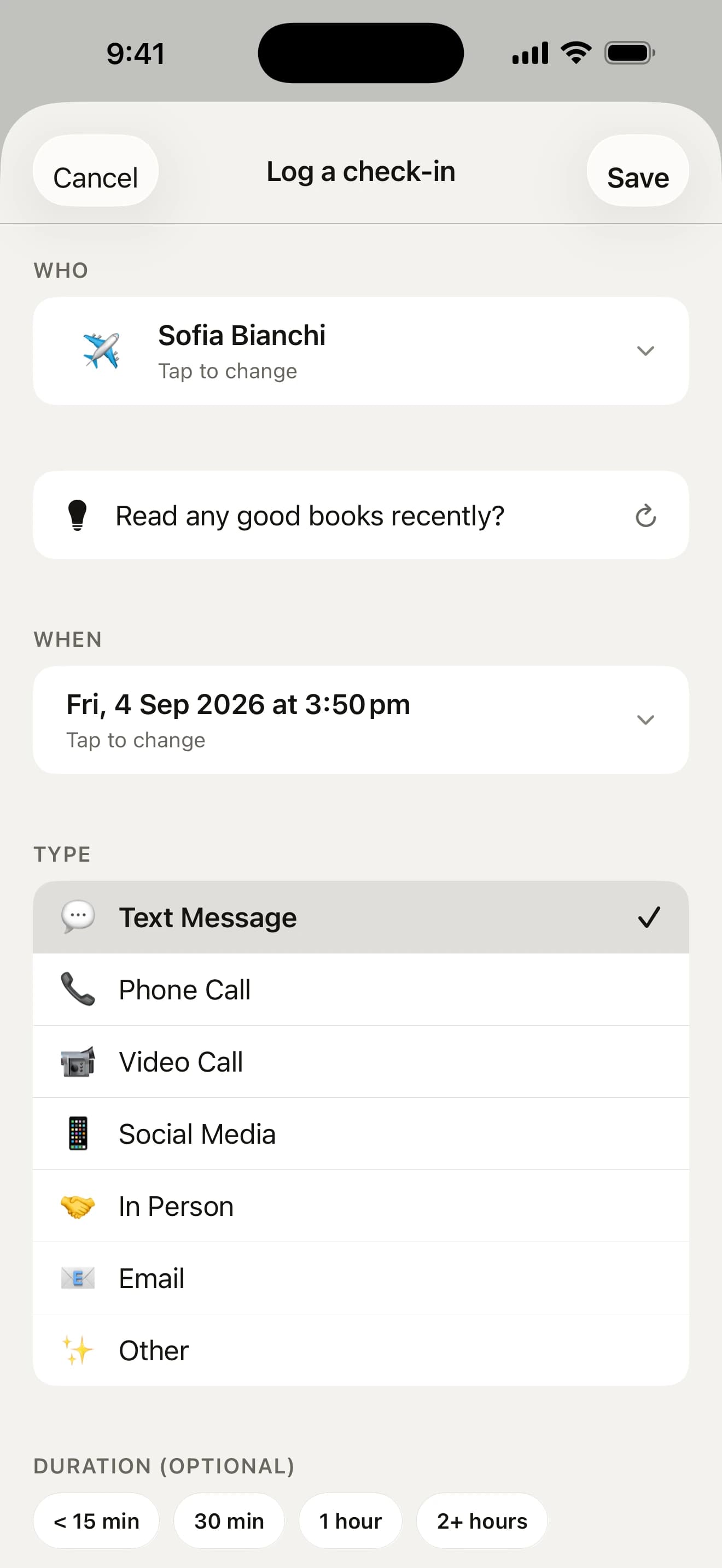
Tap a mate on Today and their page opens, with ways to call or text them under their name. Tap Check In Now there and a half-height sheet opens, already set to the way you usually catch up with them, so most check-ins take two taps.
- Swipe a mate right on Today or Mates to log it on the spot
- Press and hold and tap text, call, video or in person
- From the Lock Screen, press and hold a reminder and tap Check In
A press-and-hold log comes with Undo, and Add note opens it straight on the notes if something’s worth remembering.
Add the details, if you like

Drag the sheet up, or tap “Add details”, for the extras:
- how it went, how long it lasted and a photo
- a note, typed or spoken, transcribed on your iPhone
- “Follow up in a week”, which brings the note back as a reminder
- “They reached out first”, for the mates who think of you
Dates you mention in a spoken note (“her scan’s on the 12th”) are offered as reminders. Add a photo from last weekend and it offers to log it on the day it was taken.
Can I just type what happened?
Yes. Tap + on the Log tab and write or dictate one line. Howdy Mate! picks out the mates, the kind of catch-up and the day, fills them in below, and keeps the line as your note.
- Coffee with Ana yesterday
- drinks with Sam and Priya last night
Two Sams? It asks which one rather than guessing.
Caught up with someone who isn’t a mate yet? The list of mates ends with Someone new: tap it, type their name and they’re added and picked, without leaving the check-in. A search that finds nobody offers the name you typed instead.
Logged for you

A lot of catch-ups log themselves, so you don’t have to remember:
- call, text or FaceTime from the app, and it’s logged when you come back
- a dinner in your calendar with a mate’s name on it asks “log it?” once it’s over
- once a week, the look-back lists who you probably saw, with a yes or no beside each
The Log: a quiet diary of catch-ups

Every check-in, grouped by day, with the notes you left and the photo if you saved one. Search names, notes and places across your whole history (“zoe” finds Zoë), or star the good ones and see just those.
Swipe a check-in right to star it or left to delete it, with Undo. Press and hold one to edit it or save it as a memory.
Your questions, answered
Can I log a catch-up without opening the app?
Yes. Press and hold a reminder and tap Check In, or tap Add a Note, type a line like “talked about the new job” and tap Log. It’s saved as the way you usually catch up with that mate, and the app stays closed. Siri, the widgets and the Log control in Control Center work without opening the app too.
Can I just type or say what happened?
Yes. Tap + on the Log tab and type or dictate a line like “Coffee with Ana yesterday” or “called Mum on Sunday”. Howdy Mate! picks out the mates, the kind of catch-up and the day and fills them in below, where you can change anything, and keeps the line as your note. Two mates with the same first name? It asks which one rather than guessing. It all happens on your iPhone.
Do I have to add someone before I can log a catch-up with them?
No. When you log a catch-up, the list of mates ends with Someone new. Tap it, type their name and tap Done, and they’re added and picked for the check-in on a monthly rhythm, without leaving it. If you searched for them and nobody matched, the row offers the name you typed. Someone already on your list is picked instead, so nobody is added twice. Their photo, birthday and number can wait for their page.
Can I log a catch-up from the past?
Yes. Tap When on the check-in to pick any earlier day and time, or tap Yesterday or the weekend just gone. Quicker still, add a photo from that day: if it was taken on another day, the app asks “Log it on that day?”, and one tap moves the check-in there. Only the date the photo was taken is read, on your iPhone.
Can I note when a friend reached out to me first?
Yes. When you log a catch-up, open “Add details” and tap “They reached out first”. Once a mate has started a few of your recent catch-ups, their page says so (“They reached out 3 of the last 8 times”), and Recap shows how often mates got in touch first. Nothing is shown for a mate who hasn’t, because it’s there to notice the people who think of you, not to keep score.
Can I see when I last saw someone in person?
Yes. A mate’s page says when you last logged an in-person catch-up and where, if you added a place (“In person: 8 months ago · Fitzroy”). Group get-togethers count for everyone in them. When it’s been a long while, Draft adds an opener that suggests meeting up.
I’m on a roll. Can it show me who’s next?
Yes. Log a catch-up from Today and, while anyone else is still under “Needs you”, the confirmation adds a line like “Next: Ana”. Tap Text to open your chat with her, and it’s logged when you come back. It skips anyone snoozed and stops suggesting after five in a row, so it never feels like a treadmill.


Go on, say howdy.
Free on the App Store for iPhone. No account, no subscription, no catch.
On a computer? Point your iPhone’s camera here.